COF AI SystemOpen the slide deckEnter
Building the information system for the COF Secretariat together

COF AI System for TPA

Let us clarify three things together: what this system is for, what it delivers to each group of people, and how we get there step by step.

Part 1

Where COF stands today, and the challenges

COF (the Chief Office) sits between the leaders and the rest of the organization. The four pain points below are our starting point for deciding together which problem to tackle first.

Packed leader calendars make scheduling and rescheduling costly

Every time a meeting is added, the secretary must work out which meeting can move, where it can move to, and who is affected. It often takes several rounds of back and forth to settle.

Requests arrive from many channels, so it is hard to tell what matters

Requests to meet a leader come in by phone, email and chat. It is very hard to see at a glance which are urgent, which can wait, and why.

Post-meeting directives are hard to follow through

Meeting conclusions are recorded, but who owns each task, by when, and how far along it is end up scattered across minutes and emails, so things slip without anyone noticing early.

Knowledge is scattered

Resolutions, regulations, customer information and internal terminology live in many places. Newcomers and units keep asking COF questions that already have answers.

Part 2

Vision

An information system run by COF: AI handles the repetitive work, people keep the decisions.

Leaders spend their time on strategy. COF spends its energy on work that needs judgment. For everything else, the system works alongside them and states clearly what it has done.

Users and channels

Where people work every day
TeamsWebLeader notifications (read-only cards)

Shared core

One core for all 16 apps
Leader profilesRules and approvalsAI assistantsEnterprise knowledgeAudit log

Microsoft 365

The systems you already use
CalendarMailDocumentsTeams

Leaders do not have to learn a new app

Leaders receive updates where they already work, as read-only cards. Any action taken on a leader's behalf is recorded by the secretary. The prototype simulates this channel with a dedicated feed.

COF operates the system and makes the decisions

COF sets the rules, sets the automation level for each type of work, and approves what the system proposes. The system never decides in place of COF.

Data and rules belong to the organization

Leader profiles, rules and enterprise knowledge are versioned, logged data that can be exported to spreadsheets. Switching AI vendors or the underlying system does not lose them.

Part 3

Benefits for each group

Each benefit below is tied to a specific feature you can open and see in the prototype.

Leaders

Less time pulled into calendar coordination, more time for the big decisions.

Time for strategic work

Requests are priority-scored with an explanation, and time slots are found using each leader's own rules. Leaders only receive what truly needs them.

A01 · Scheduling with C-levelA14 · Leader time

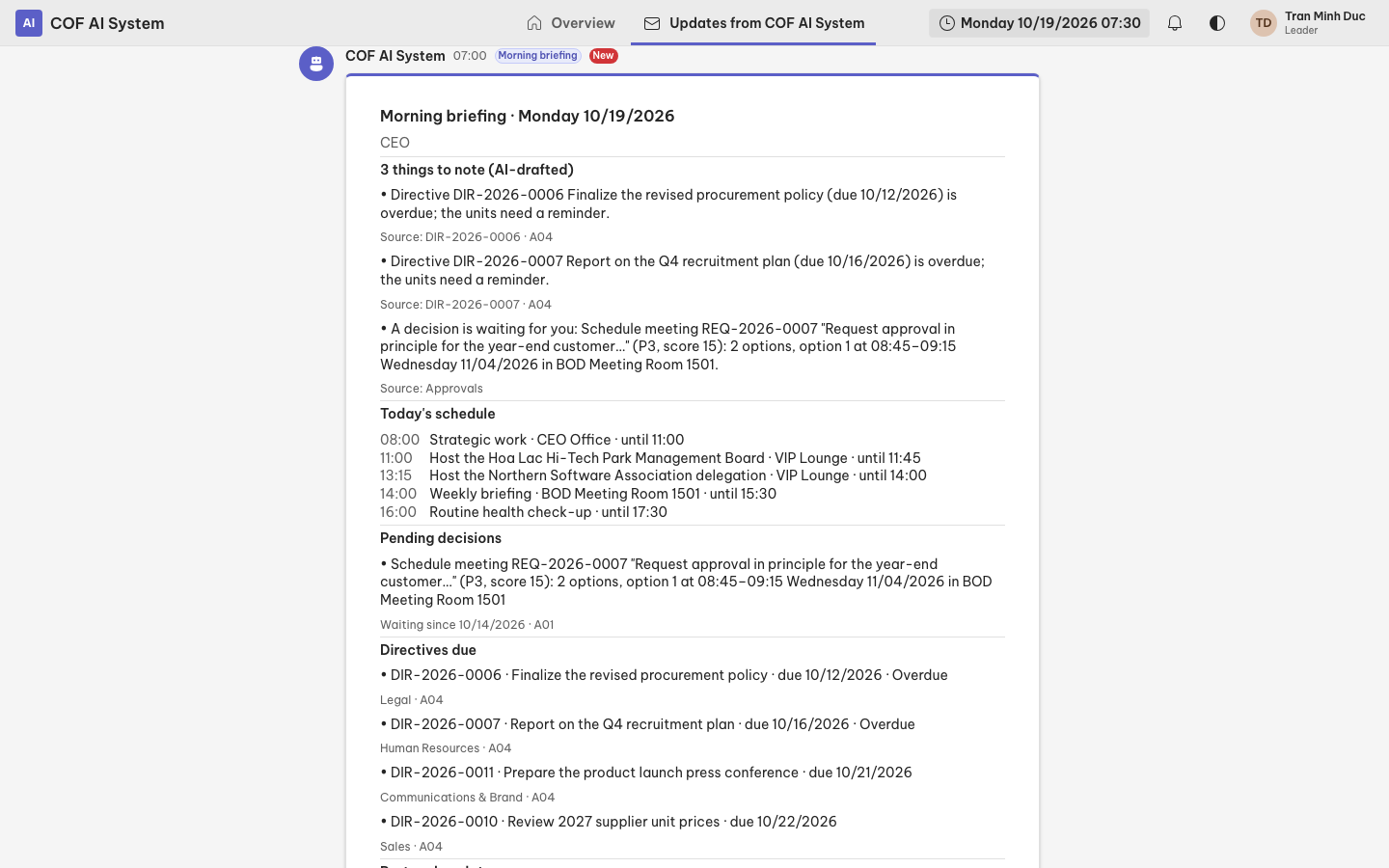
Morning briefing

One read-only card each morning: today's schedule, items awaiting a decision, and directives coming due.

A07 · Morning briefing

Pre-meeting brief

Before a meeting, the leader receives a brief the secretary has reviewed: background, history of the relationship, and the points that need a decision.

A02 · Pre-meeting brief

The COF team

Less repetitive work, one place to approve, and the full picture.

Less repetitive work

Request triage, document drafts, and minutes with action items are prepared by the system so the secretary reviews instead of starting from scratch.

A13 · One-stop intakeA05 · DraftingA03 · Minutes & action items

One Approvals inbox

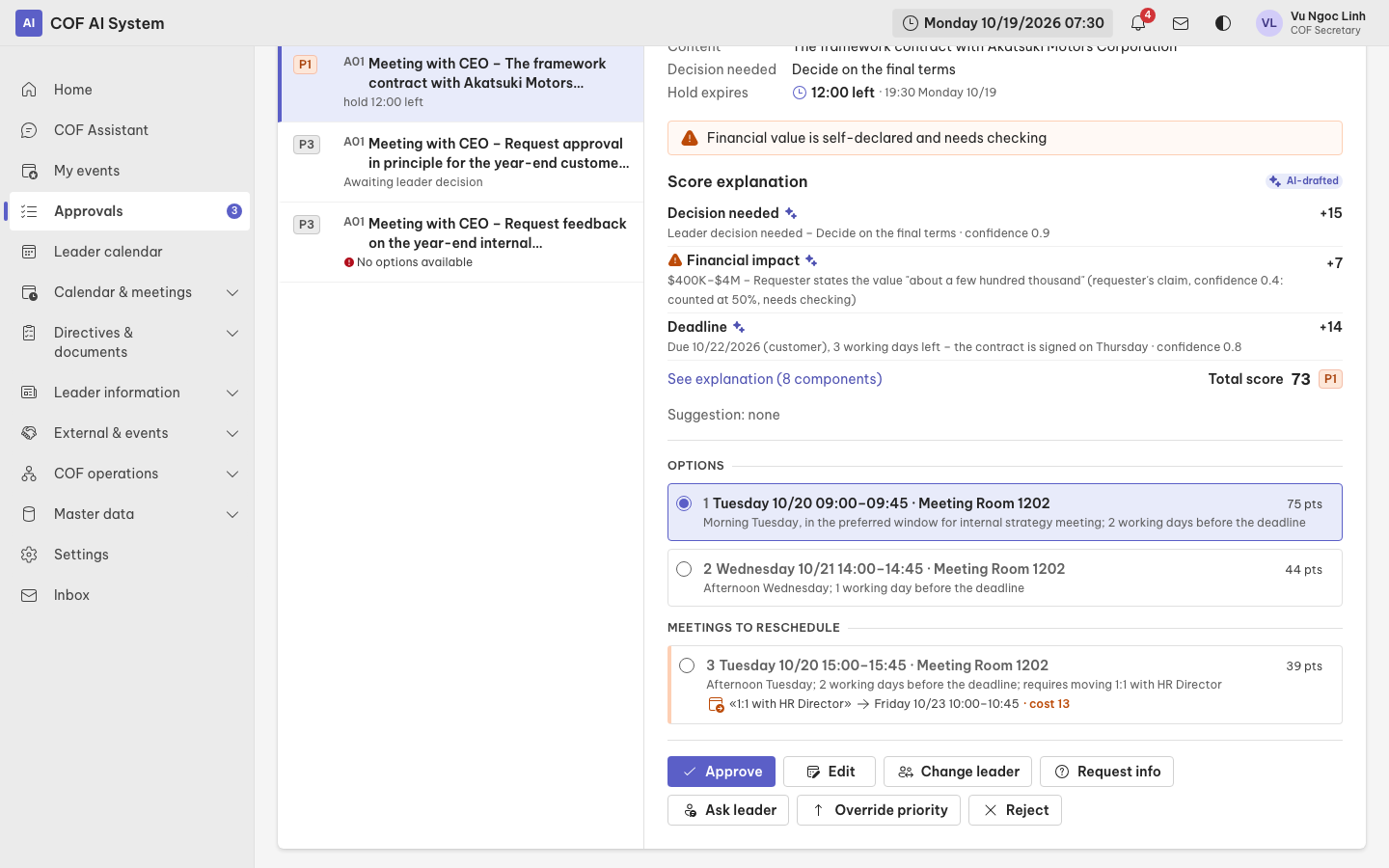
Every proposal that needs a human decision lands in one place, with the reasons, the priority score and the options (including options that require rescheduling a meeting).

Approvals

The full picture

The home page shows what is in progress, on time and overdue; the audit log shows who approved what and what the system did.

HomeAudit log

Units

One front door for requests, clear status on your own items, and self-service lookup of regulations.

One front door for requests

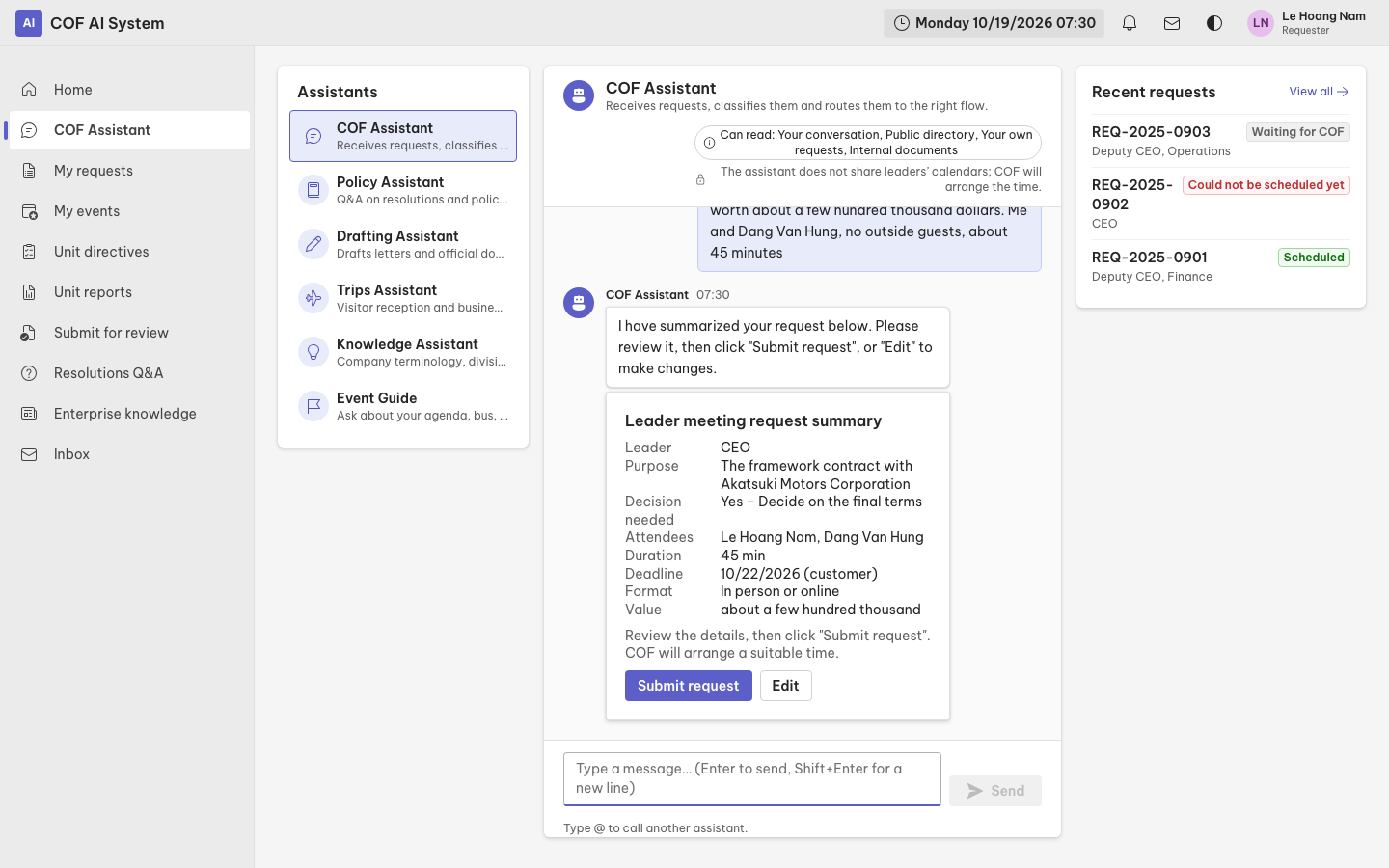
Message COF Assistant in plain language. The assistant asks follow-up questions until it has what it needs, then routes the request to the right place.

COF AssistantA13 · One-stop intake

Know the status

Every request shows its status, response deadline and scheduled meeting time, so there is no need to ask COF again.

My requests

Regulations Q&A

Ask in plain language; answers cite the source documents and stay within what you are allowed to see.

A09 · Resolutions Q&A

Metrics: measured together during the pilot

We do not quote any savings figures here because we do not yet have your own organization's data. Instead, during the pilot we will choose a few indicators together and measure them before and after:

  • time from submitting a request to having a meeting scheduled
  • number of meetings rescheduled by hand
  • share of directives completed on time
  • number of requests that needed follow-up because of missing information
Part 4

Value and features

Sixteen apps run on one shared core, plus three building blocks that make the system truly your organization's own.

16 apps in 5 groups

All apps share one core, so adding a new app does not mean rebuilding the foundation.

Calendar & meetings

  • A01Scheduling with C-level
  • A02Pre-meeting brief
  • A03Minutes & action items

Directives & documents

  • A04Directive tracking
  • A05Drafting
  • A06Submission review

Leader information

  • A07Morning briefing
  • A08Report consolidation
  • A09Resolutions Q&A

External & events

  • A10Partner relations
  • A11Trips & visitors
  • A12Board & AGM meetings
  • A16Major events

COF operations

  • A13One-stop intake
  • A14Leader time
  • A15COF handbook

Assistant library

Many assistants, each with its own name, job and permissions. Each assistant's read access is defined in code and shown openly; administrators can only adjust presentation, and every change goes through a proposal and approval.

Assistants

Enterprise knowledge

The company profile, divisions, terminology, customers and catalogs are versioned data. The system assembles the right slice of knowledge into each assistant's context, so no proper name is hard-coded in a prompt.

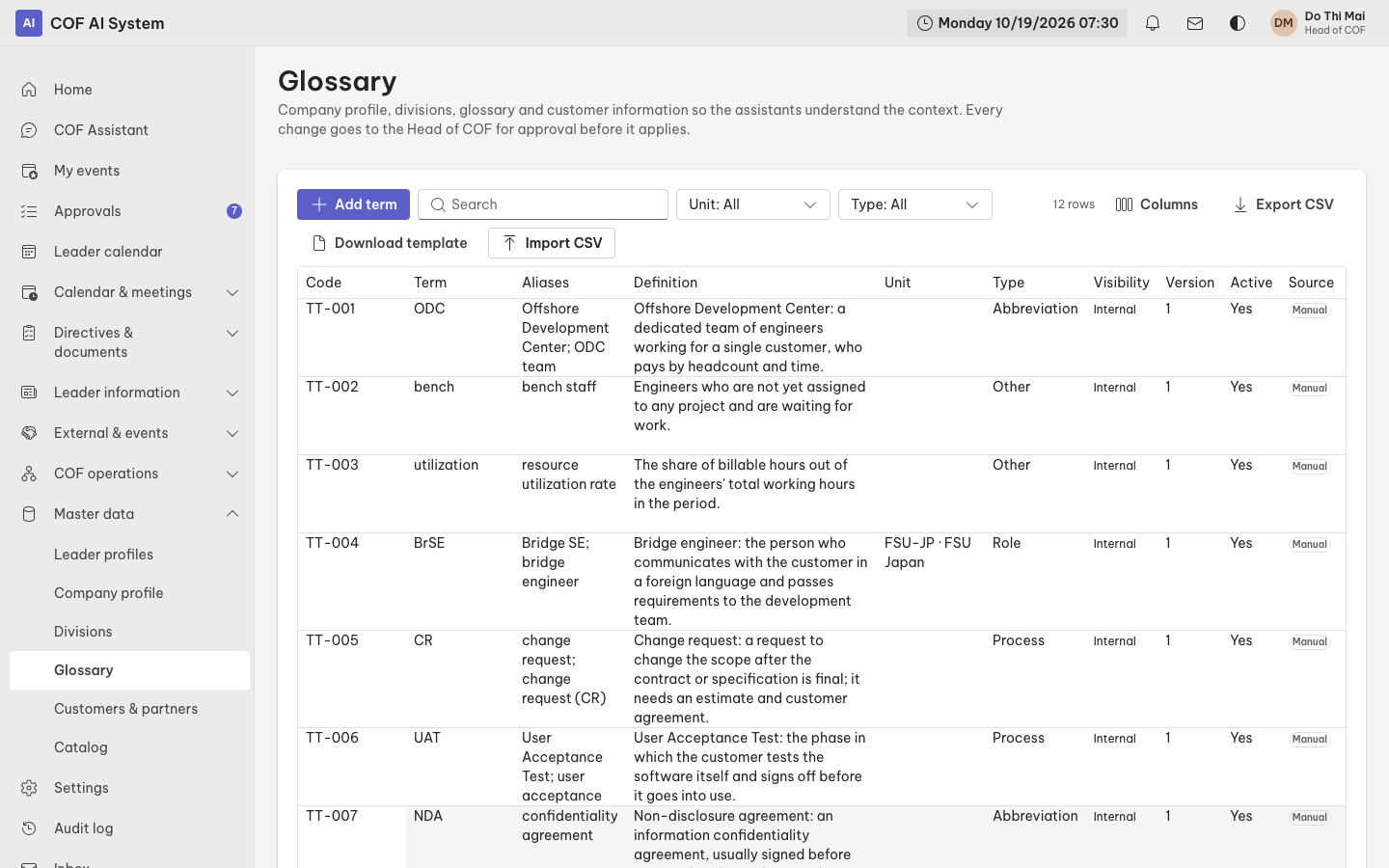
Enterprise knowledge

Settings and master data as tables

Scoring, automation and enterprise knowledge are tables: export to a CSV file that opens in a spreadsheet, edit in bulk, then import it back. Importing a file only creates proposals for authorized people to approve. Connecting directly to SharePoint or Sheets is the next step.

Settings
Approvals screen showing a meeting request with scheduling options, including one that requires rescheduling a meeting
Approvals: an explained priority score and three options, one of which reschedules a meeting.
Chat screen with COF Assistant and the list of assistants
COF Assistant: write in plain language; each assistant has its own job and permissions.
Leader feed with a read-only Morning briefing card
Leader notifications: read-only cards with no action buttons.
Terminology table with search and file export and import buttons
Settings as tables: search, sort, export and import files.
Part 5

Control and trust

The system is only useful if you are comfortable handing work over. That is why control was designed first, not bolted on afterwards.

AI proposes, people decide

Anything with an outside effect (changing the calendar, sending mail, changing a leader profile or settings) goes through a proposal, a policy check, and approval when required. Assistants never write directly to data.

Every step is logged

Proposals, approvals, executions, and changes to leader profiles and rules all leave an audit entry: who did it, when, and why.

Data boundaries between assistants

The user-facing assistant cannot read calendars or leader profiles. This boundary is enforced by a dependency-analysis tool and by tests, not just by promises.

Important decisions use transparent logic

Priority scoring, slot finding and rescheduling cost are deterministic code, explainable down to each point. AI only extracts information, summarizes and drafts.
Three levels of automation

Level 1 · Suggest only

The system suggests; COF does the work.

Level 2 · One-tap approval

The system prepares everything; it only executes after COF reviews and approves.

Level 3 · Act, then report

The system acts immediately and informs COF afterwards. Reserved for low-risk work that the Head of COF deliberately turns on.

Things that are never automated

  • Rescheduling a meeting already on the calendar
  • Work at the most urgent priority (P0)
  • Confirming rules in a leader profile
  • Anything related to Board of Directors and General Meeting of Shareholders meetings
Part 6

How we roll it out

Small steps, measurable results, expanding once COF feels it is solid. Each phase below is a proposal for us to adjust together.

Phase 0 · Everything

Discovery and co-design with the COF team

Goal

Understand how COF works today and settle the scope of the pilot.

Key work

Interview secretaries and leaders, document working rules, choose one or two pilot leaders, and prepare master data as tables.

How we measure

A list of rules and master data confirmed by COF.

Phase 1 · A01 · Scheduling with C-level

Pilot Scheduling with C-level for one or two leaders

Goal

Prove the value where the effort is greatest: scheduling and rescheduling.

Key work

Enter leader profiles, connect calendars, run in parallel with the current way of working, with COF approving each proposal.

How we measure

Time from request to scheduled meeting; share of options COF accepts on the first try.

Phase 2 · Calendar & meetings, Directives & documents

Expand to Calendar & Meetings and Directives

Goal

Connect the work before, during and after meetings into one flow.

Key work

Add pre-meeting briefs, minutes and action items, directive tracking, document drafting and submission review.

How we measure

On-time directive rate; time from meeting end to approved minutes.

Phase 3 · Leader information, External & events

Leader information and External relations

Goal

Give leaders the right information at the right time and look after partner relationships.

Key work

Morning briefing, report consolidation, resolutions Q&A, partner relations, trips and visitors, Board meetings.

How we measure

How often leaders open and use the briefing; number of cited answers and number of unanswered questions.

Phase 4 · COF operations, Enterprise knowledge

COF operations and knowledge

Goal

COF runs and extends the system on its own, and knowledge stays up to date.

Key work

One-stop intake, leader time tracking, the COF handbook, completing enterprise knowledge, and connecting data sources.

How we measure

Number of tickets classified correctly the first time; share of handbook articles updated on time.

Duration of each phase: to be agreed together during discovery.

The COF team co-designs

Each phase begins with a working session with the secretaries and ends with a look back together. Adjusting along the way is normal.

Leader rules are entered and confirmed by secretaries

The system never infers rules from behavior. The secretary enters them, the leader confirms outside the system, the secretary records the confirmation, and every change is versioned.

Master data starts from spreadsheets

Enterprise knowledge, scoring and automation start from familiar spreadsheet files, so there is no need to wait for system integrations before getting going.

Microsoft 365 integration

Integration through Microsoft Graph, step by step: calendar, mail, documents, Teams. The prototype currently uses a simulation at the adapter layer; when we connect for real, only the adapter changes while the architecture and rules stay the same.

  • Calendar
  • Mail
  • Documents
  • Teams
Risk

Leader profiles and master data are incomplete at the start

Mitigation

Phase 0 enters and confirms them with COF; when information is missing, the system asks instead of guessing.

Risk

AI misunderstands or drafts incorrectly

Mitigation

AI only proposes; outside actions go through approval; quality is measured with an evaluation suite before raising the automation level.

Risk

Leaders and COF are not used to the new way of working

Mitigation

Leaders do not have to learn a new app; COF runs in parallel with the old way during the pilot.

Risk

Permissions and sensitive data

Mitigation

Role-based permissions, hard data boundaries between assistants, and a complete audit log for later review.

Part 7

Try it yourself

The fastest way to understand it is to use it. Pick a role, enter with sample data, and follow the suggestions for about five minutes.